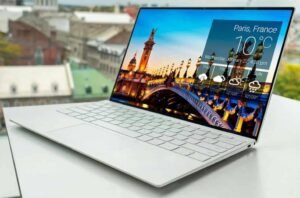
If you want a simple, low-cost 14-inch Windows laptop for school and home basics, the HP 14 (14-dq0040nr, Snowflake White) is built exactly for that job: web browsing, email, Google Docs, YouTube/streaming, and light Zoom-style calls. It pairs an Intel Celeron N4020 with 4GB RAM and 64GB eMMC storage, and it keeps the body light at about 3.24 lb with a slim, micro-edge design.
This is not a “do-everything fast” laptop. The Celeron N4020 is widely categorized as an entry-level processor, and you should expect slowdowns if you try to multitask heavily (many tabs + streaming + downloads at the same time).
A key marketing phrase you’ll see is “4K graphics” or “4K ready.” Here’s the honest meaning: the Intel UHD Graphics 600 can support 4K output in some situations, but this laptop’s built-in display is HD (1366×768), and its HDMI 1.4b connection typically means 4K at up to 30Hz, not 60Hz. Also, many streaming services have extra rules for true 4K playback on Windows laptops.
Verified specifications
HP’s official support specifications and the HP product sheet (often used by major retailers) are the most reliable “source of truth” for the core hardware.
Product spec table
| Specs Area | HP 14 (14-dq0040nr, Snowflake White) |
| CPU | Intel Celeron N4020 (2 cores, up to 2.8 GHz burst) |
| Graphics | Intel UHD Graphics 600 (integrated) |
| RAM | 4GB DDR4-2400 (1×4GB); “not user accessible” (HP wording) |
| Storage | 64GB eMMC |
| Display | 14″ HD (1366×768) micro-edge BrightView, 220 nits, 45% NTSC |
| Battery | 3-cell 41Wh Li-ion |
| Battery life claims | Up to 11h 30m video playback; up to 9h wireless streaming (HP tests) |
| Fast charge | 0–50% in ~45 minutes (HP Fast Charge claim) |
| Dimensions | 12.76″ W × 8.86″ D × 0.71″ H |
| Wireless | Wi‑Fi 5 (1×1) + Bluetooth 4.2 (Realtek RTL8821CE) |
| Ports | USB‑C (5Gbps, data only), 2× USB‑A (5Gbps), HDMI 1.4b, SD reader, audio combo jack |
| Camera | 720p webcam with dual-array mics |
| Warranty | 1-year limited hardware warranty |
Key features, best-fit users, and real-world performance expectations from HP 14 (14-dq0040nr)
Think of this laptop as a reliable “starter” device. It’s made to be carried, opened quickly, and used for simple tasks without drama, not for heavy creative work or gaming.
The design selling points are easy to see: HP highlights a thin-and-light build, a micro-edge bezel (6.5 mm), and a 79% screen-to-body ratio, which makes the 14-inch screen feel bigger than older thick-bezel budget laptops.
What it handles well
For everyday use, expect a “good enough” experience with:
- school portals, online homework, and essays
- email and basic spreadsheets
- streaming video and casual music
- video calls (with a basic 720p camera)
What will feel slow
This is where the “rigorous” part matters: the Intel Celeron N4020 is widely described as a slow dual-core meant for low-cost systems, and the 4GB RAM matches Windows 11’s minimum baseline—not a comfort target.
So if you are the kind of person who keeps 20–40 browser tabs open and runs multiple apps at once, you will likely see:
- slower tab switching
- more waiting when Windows updates run
- pauses when the system uses the drive as “backup memory”
Target users
This HP 14 is most realistic for:
- kids and students needing a first laptop
- families who want a “house laptop” for bills and school
- seniors who want a simple Windows device for email and video chats
- buyers who value low price + portability over speed
Battery, portability, and daily carry experience
If your day includes moving between rooms, classes, or cafés, the HP 14’s weight (~3.24 lb) and slim profile are a real advantage.
HP claims up to 11.5 hours for local video playback and up to 9 hours for wireless streaming in its testing. In real life, your results will change based on brightness, Wi‑Fi strength, tab count, and background updates, but the official test notes make clear these claims come from controlled conditions.
The HP Fast Charge feature (0–50% in about 45 minutes) is a practical win at this price, because it helps you recover quickly when you forget to charge overnight.
Display, graphics, and the truth about the “4K graphics” claim
The built-in screen is HD (1366×768). That is fine for homework and videos, but it will not look as sharp as 1080p, and it’s not designed for color-critical work (HP lists 45% NTSC).
What “4K graphics” really means here
You’ll see “4K ready” language in listings (including Amazon). HP’s own product sheet also says the UHD graphics can “smoothly stream 4K content,” which is marketing shorthand for capability, not a guarantee that you’ll get a perfect 4K experience everywhere.
From Intel’s official specs, the UHD 600 iGPU supports 4K in general, but max resolution over HDMI is 4096×2160 at 30Hz. That lines up with HDMI 1.4b, which supports 4K at 24–30Hz (and stronger 1080p refresh rates).
Why 4K streaming may still be limited
Even if a laptop can output 4K, some streaming services add extra rules for Ultra HD on Windows. Netflix’s own Windows help page states that for Ultra HD you typically need Windows 11, Edge or the Netflix app, a 4K 60Hz screen, and hardware requirements that often include newer CPUs/GPUs than what this HP 14 uses—plus HEVC codec availability.
Simple takeaway: this HP 14’s “4K graphics” claim is best read as “can connect to a 4K display in some cases”, not “this is a true 4K streaming laptop.”
Connectivity, ports, and software bundle
Ports and everyday connectivity
You get a very usable set of ports for school and home: USB-A for older devices, USB-C for modern accessories, HDMI for a monitor/TV, and an SD card reader for moving photos and files.
A critical detail: the USB‑C port is labeled data transfer only in HP’s spec, so you should not buy this expecting advanced USB‑C monitor features. HDMI is the more reliable way to add a second screen.
Windows 11 Home and S mode
Retail listings vary. HP documentation for this configuration lists Windows 10 Home in S mode, while Amazon’s listing shows Windows 11 in S mode and markets it as Windows 11 Home. Treat the OS as seller-dependent and confirm before buying.
If your unit comes in S mode, Microsoft explains you can switch out of S mode for free, but it’s a one-way switch.
Microsoft 365 bundle
Many shoppers search “HP 14-dq0040nr with Microsoft 365 included,” and for good reason: the HP retail product sheet states Microsoft 365 Personal 1-year subscription included (with activation timing rules), and Amazon product naming also highlights “One Year of Microsoft 365.”
However, HP’s support spec page for the same model notes a 1-month trial for new Microsoft 365 customers. That’s a real mismatch, so the most honest guidance is: assume the Microsoft 365 benefit can vary by retailer bundle, and verify what your seller includes before checkout.
If you do receive Microsoft 365 Personal, Microsoft describes it as a 1‑person plan that includes premium apps and 1TB OneDrive cloud storage—useful on a 64GB laptop.
Upgradeability, upgrade costs, and a simple ownership plan

Can you upgrade the RAM of HP 14 (14-dq0040nr)?
HP’s product sheet explicitly says the memory slot is not user accessible, and HP service documentation warns that internal service procedures are for authorized providers (accessing internal parts can risk damage or warranty issues).
That said, HP’s maintenance/service guide for this laptop family shows a memory module slot for Pentium/Celeron configurations and describes memory removal/replacement steps, with official spare parts listed for 4GB and 8GB modules.
The hard limit is Intel: the Celeron N4020’s official spec lists 8GB max memory. So “4GB to 16GB” is not realistic for this platform.
Can you upgrade storage of HP 14 (14-dq0040nr)?
This model’s confirmed internal storage is 64GB eMMC. HP’s service guide lists “eMMC configurations” for Pentium/Celeron models, which strongly suggests the internal storage is not meant to be swapped like an SSD.
The most reliable “upgrade path” is external expansion: SD card + USB storage + cloud.
Typical upgrade costs
Prices change, but these are realistic reference points in the U.S. market:
- 256GB microSD: Samsung lists the EVO Select 256GB at $29.99 (often enough for school files and photos).
- 1TB external SSD: Crucial’s X9 line is a common pick for fast plug-in storage (pricing varies by retailer).
- 8GB DDR4‑2400 SODIMM: Crucial’s CT8G4SFS824A is a known match for many DDR4‑2400 laptops (availability varies, and service labor is extra).
Is the HP 14 laptop worth buying?
It is worth buying when your expectations match the price. If you need a simple Windows laptop for homework, email, and streaming—and you like the light design—this model delivers that basic mission with verified battery and portability claims.
It is not a great choice if you need fast multitasking, lots of local storage, or long-term “grow with me” performance. The Celeron N4020 class is explicitly described as slow, and 4GB RAM is the Windows 11 minimum floor.
Is 4GB RAM good for an HP laptop?
4GB RAM is okay for light use, but it is tight. Microsoft lists 4GB as the minimum requirement for Windows 11, so it’s better viewed as “can run” than “will feel roomy.”
If you want fewer slowdowns, the single best improvement (if serviceable for your unit) is moving toward 8GB—still within the N4020 platform’s 8GB limit.
Can I upgrade my laptop RAM from 4GB to 16GB?
For this specific CPU platform: no. Intel’s official specification for the Celeron N4020 lists 8GB max memory, and HP’s documentation indicates the memory area is not meant to be user-accessed.
If you truly need 16GB, you are shopping in a different laptop class (many OmniBook and Surface configurations start far above 4GB).
Want To Buy?
If you want a budget-friendly HP 14-inch laptop that’s light in your bag and simple to use—especially for school basics and streaming—the HP 14-dq0040nr in Snowflake White is a sensible pick as long as you plan for its limits (small storage and light multitasking).
Add a microSD card early, keep your tabs under control, and use cloud storage to stretch that 64GB eMMC. When you’re ready for a bigger step, an OmniBook or Surface model with 16GB RAM and SSD storage will feel like a different world.